When I first started exploring Web3, I assumed that storing files on a blockchain meant putting the entire file directly inside the blockchain.
That’s not normally how it works.
Large files such as images, videos, documents, and website assets are usually too expensive or inefficient to store directly on a blockchain. Instead, Web3 applications can use decentralized storage systems such as IPFS.
This creates a different approach to storing and retrieving information.
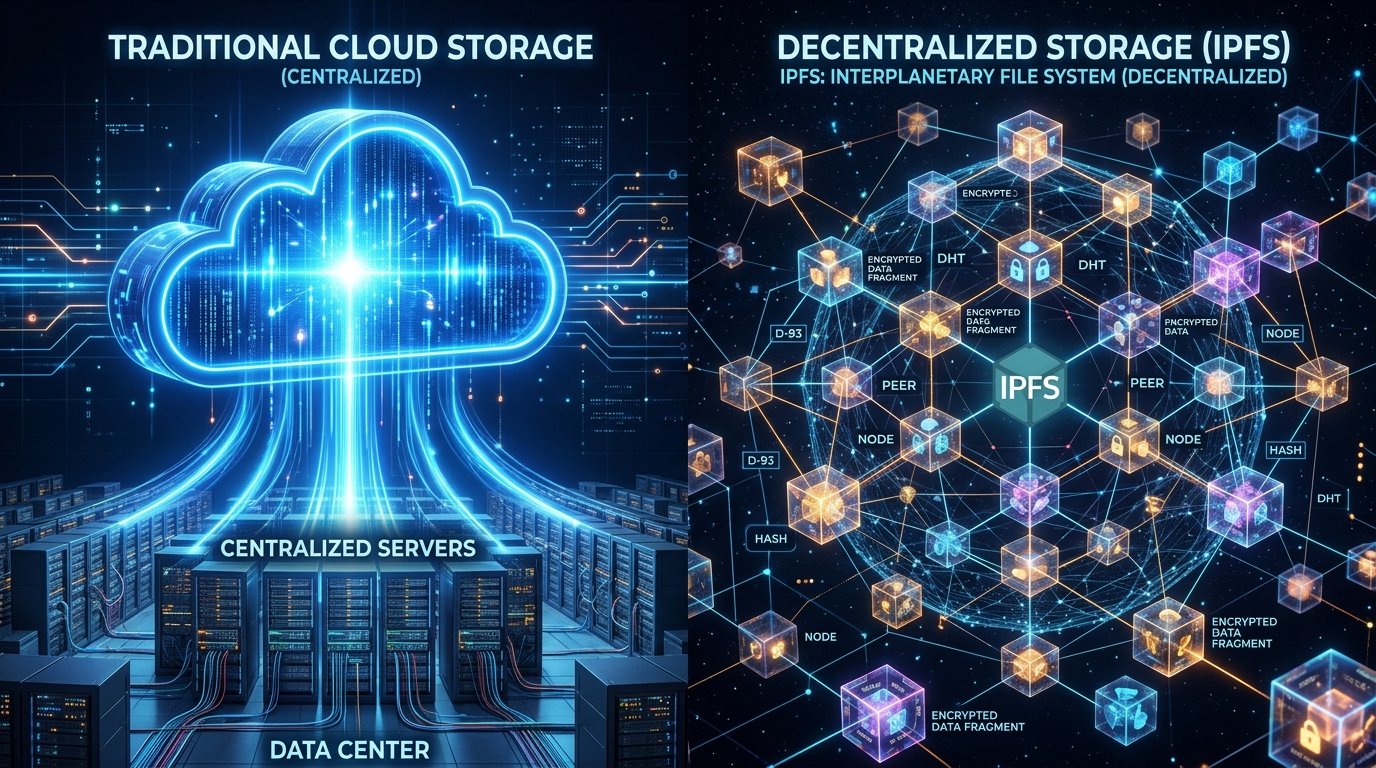
Traditional services such as Google Drive, Dropbox, Amazon S3, and Microsoft Azure generally rely on centralized infrastructure. You upload a file to servers operated by a company, and that company manages the infrastructure used to store and deliver it.
IPFS takes a different approach. Rather than depending on one central server location, IPFS uses a distributed network and content-addressing system to identify and retrieve data.
Neither approach is automatically better for every situation.
For personal documents, business applications, backups, and everyday file sharing, traditional cloud storage can be extremely convenient. For certain Web3 applications, decentralized storage can provide useful properties that centralized storage doesn’t.
Let’s look at how the two approaches actually differ.
What Is Decentralized Storage?
Decentralized storage is a method of storing and retrieving data across a distributed network rather than relying entirely on one centralized storage provider.
Instead of saying:
“My file is stored on this company’s server.”
the architecture can involve multiple participants or storage providers.
Depending on the system, data may be:
- Distributed across multiple nodes
- Replicated
- Identified using content-based identifiers
- Retrieved from participating storage providers
- Integrated with blockchain applications
This doesn’t necessarily mean every decentralized storage system works exactly the same way.
IPFS, Filecoin, Arweave, and other decentralized storage technologies have different architectures and economic models.
What Is IPFS?
IPFS stands for InterPlanetary File System.
Despite the unusual name, you don’t need to know anything about space to understand it.
IPFS is a distributed protocol designed to help computers store and retrieve content using content addressing.
Traditional web URLs generally tell your browser where to find something.
For example:
https://example.com/photo.jpg
The address points toward a particular location on the internet.
IPFS can identify content based on the content itself.
A simplified example might look like:
ipfs://Qm...
The exact identifier depends on the content-addressing system being used.
The important idea is:
Traditional URL → Where the content is
IPFS content identifier → What the content is
How Does IPFS Work?
Let’s say you have a photo that you want to make available through IPFS.
The simplified process looks like this:
Step 1: Add the File
You upload the file to an IPFS node or an IPFS-compatible service.
Step 2: IPFS Creates a Content Identifier
The system generates an identifier based on the content.
Step 3: The File Becomes Addressable
Applications can use the identifier to request the content.
Step 4: Other Nodes Can Retrieve It
If the content is available through the IPFS network, participating nodes can provide it.
This is different from relying on a single server location.
What Is Content Addressing?
Content addressing is one of the most important concepts behind IPFS.
Imagine you upload a file.
Instead of identifying it only by a filename such as:
holiday-photo.jpg
IPFS creates an identifier related to the content.
If the file changes, the resulting identifier changes as well.
This creates an interesting property:
Different content → Different identifier
For Web3 applications, this can be particularly useful because an application can reference a specific version of content.
For example, an NFT might contain metadata pointing to an IPFS resource.
IPFS Does Not Mean “The File Is Automatically Permanent”
This is a very important distinction.
Many beginners hear “decentralized” and assume that once they upload something to IPFS, it will remain available forever.
That’s not necessarily true.
IPFS is a protocol and network for addressing and exchanging content.
For content to remain readily available, someone needs to keep the data available or provide an appropriate persistence/storage service.
If nobody is hosting or retaining the content, retrieval may become difficult.
This is why services such as IPFS pinning providers exist.
What Is IPFS Pinning?
Pinning tells an IPFS node or service to retain particular content and keep it available.
For example, you might upload:
website-image.png
to an IPFS pinning service.
The provider keeps a copy associated with the relevant content identifier.
This makes the file more reliably available than simply adding it temporarily to your own local node and then shutting that node down.
Pinning is therefore an important part of many practical IPFS deployments.
IPFS vs Traditional Cloud Storage
Here’s the basic difference:
| Feature | IPFS / Decentralized Approach | Traditional Cloud |
|---|---|---|
| Architecture | Distributed | Centralized provider infrastructure |
| Data addressing | Content-based | Usually location/URL-based |
| Main control | Depends on architecture/provider | Cloud provider |
| Availability | Depends on nodes/pinning | Provider manages availability |
| Scalability | Distributed model | Highly scalable provider infrastructure |
| Ease of use | More technical | Usually very easy |
| Enterprise tools | More limited | Extensive |
| Web3 integration | Strong | Requires additional infrastructure |
| Data persistence | Requires appropriate providers/pinning | Provider-managed |
| Performance | Depends on gateways/network | Usually predictable |
The important point is that decentralized doesn’t automatically mean faster, cheaper, or more secure.
The right choice depends on what you’re storing and what you’re trying to accomplish.
How Traditional Cloud Storage Works
When you use a service such as Google Drive or Dropbox, your file is uploaded to infrastructure operated or managed by the service provider.
You normally don’t have to think about:
- Server maintenance
- Hardware replacement
- Network routing
- Data replication
- Storage infrastructure
- Most backup operations
The provider handles much of this behind the scenes.
That’s one reason centralized cloud storage is so popular.
You open an application, upload your file, and access it from another device.
Advantages of Traditional Cloud Storage
Simple User Experience
Cloud storage is extremely easy for beginners.
You can install an app on your:
- Windows PC
- Mac
- Android phone
- iPhone
- Tablet
Then upload and synchronize files.
Predictable Performance
Large cloud providers have global infrastructure designed for fast file delivery.
Advanced Features
Depending on the provider, you can get:
- Automatic synchronization
- File sharing
- Collaboration
- Version history
- Access controls
- Backups
- Business administration
Customer Support
Traditional cloud providers generally offer support systems that decentralized protocols don’t necessarily provide themselves.
Disadvantages of Traditional Cloud Storage
The main issue is centralization.
Your data depends heavily on the provider.
A provider may:
- Change its pricing
- Change its policies
- Restrict an account
- Experience an outage
- Delete content under certain circumstances
- Control access to its infrastructure
This doesn’t mean cloud storage is inherently unreliable.
In fact, major cloud providers operate highly redundant infrastructure.
The point is that the provider remains a central authority in the storage relationship.
Advantages of IPFS
1. Content Addressing
Content identifiers can make it easier to verify that the retrieved content corresponds to a particular piece of data.
2. Distributed Retrieval
Content can potentially be retrieved from different participating nodes rather than one specific server.
3. Useful for Web3
IPFS is commonly used alongside blockchain applications.
NFT metadata, images, decentralized websites, and other digital assets can use IPFS.
4. Reduced Dependence on a Single Server
A decentralized storage architecture can reduce reliance on one particular hosting location.
Disadvantages of IPFS
IPFS isn’t a magical replacement for cloud storage.
Availability Still Matters
Content needs to be hosted, pinned, or otherwise persisted.
User Experience Can Be More Complicated
Understanding gateways, CIDs, pinning, nodes, and storage providers can be confusing for beginners.
Performance Can Vary
Retrieval speed depends on factors such as:
- Network conditions
- Gateway performance
- Geographic location
- Availability of providers
- Content popularity
Privacy Isn’t Automatic
This is extremely important.
If you put sensitive information onto a public decentralized network, you should not assume that decentralization makes it private.
Publicly accessible content can potentially be retrieved by others.
IPFS Gateways Explained
You might encounter URLs such as:
This is called an IPFS gateway.
A gateway provides a familiar HTTP interface for accessing IPFS content.
Instead of installing IPFS software yourself, you can sometimes use a browser to retrieve IPFS content through a gateway.
This makes IPFS easier to use.
However, there’s an important distinction:
Using an IPFS gateway doesn’t make the gateway itself decentralized.
The underlying content may be addressed through IPFS, but the particular gateway you’re using can still be operated by a centralized organization.
IPFS and NFTs
NFTs are one of the most recognizable uses of IPFS.
Suppose an NFT represents a digital artwork.
The blockchain transaction may contain information identifying the token, while the actual image and metadata may be stored elsewhere.
The NFT metadata might contain a reference to an IPFS resource.
For example:
ipfs://...
This can help prevent the NFT from depending entirely on one ordinary web server.
But once again, the quality of the setup matters.
If the image is hosted only on a centralized server while the NFT metadata uses IPFS, the NFT isn’t necessarily as decentralized as someone might assume.
IPFS vs Blockchain Storage
These technologies are related but not identical.
A blockchain is primarily designed to maintain a shared ledger and execute blockchain-specific operations.
IPFS is designed for distributed content addressing and file exchange.
Trying to store a large video directly on a blockchain can be extremely inefficient.
A more practical architecture might look like:
Blockchain
↓
Records ownership or transaction information
↓
IPFS
↓
Stores or references the associated image or metadata
This separation can make Web3 applications more practical.
What About Filecoin?
Filecoin is another important project in decentralized storage.
While IPFS provides a protocol for addressing and exchanging content, Filecoin introduces a blockchain-based storage marketplace where storage providers can offer storage capacity.
The two technologies can be used together, but they aren’t the same thing.
A simple way to think about it is:
IPFS → How content can be addressed and exchanged
Filecoin → A marketplace/economic system for decentralized storage
The actual relationship is more technically nuanced, but this distinction is useful for beginners.
Real-World Uses of Decentralized Storage
Decentralized storage can be useful for several applications.
NFTs
Store NFT images and metadata.
Decentralized Websites
Host website assets or content using distributed infrastructure.
Web3 Applications
Store application data or digital assets outside the blockchain itself.
Public Archives
Certain projects can use distributed storage to make information more resilient to changes at a single hosting provider.
Digital Media
Images, documents, and other files can potentially be distributed through decentralized networks.
A Practical Example
Imagine you’re developing an NFT collection.
You have:
- 10,000 NFT images
- Metadata files
- A smart contract
- A marketplace listing
Putting all 10,000 images directly onto Ethereum would generally be impractical.
Instead, you could store the images and metadata using an appropriate decentralized storage solution.
The smart contract can then reference the metadata.
The overall structure could look like:
NFT Smart Contract
→ Token #1
→ Metadata CID
→ Image CID
This allows blockchain ownership information and large digital files to exist in different layers.
IPFS vs Cloud Storage: Which Is More Secure?
There’s no simple winner.
Traditional cloud providers invest heavily in:
- Physical security
- Network security
- Encryption
- Redundancy
- Monitoring
- Access controls
Decentralized storage provides different properties, such as distributed content addressing and reduced dependence on a single storage location.
But neither model automatically protects you from every threat.
For example, IPFS doesn’t automatically protect a file from someone who has obtained your encryption key.
Likewise, putting an encrypted file in Google Drive doesn’t make the encryption key magically secure.
Security depends heavily on how the system is designed and used.
Can You Use IPFS for Personal Files?
Technically, yes.
But I wouldn’t automatically replace your normal cloud backup system with IPFS.
If you have important personal documents, you need to consider:
- Privacy
- Encryption
- Backup strategy
- Recovery
- Availability
- Access control
For sensitive files, encrypt them before using any storage system where you don’t want the storage provider or network participants to access the plaintext.
For ordinary personal files, conventional cloud storage can be considerably easier to manage.
Common IPFS Mistakes Beginners Make
Mistake 1: Assuming IPFS Automatically Stores Files Forever
It doesn’t.
You need appropriate persistence, such as pinning or a storage provider.
Mistake 2: Confusing IPFS With a Blockchain
IPFS isn’t a blockchain.
Mistake 3: Putting Sensitive Data on Public IPFS
Decentralization does not equal privacy.
Mistake 4: Assuming Every IPFS Gateway Is Decentralized
A gateway can still be centralized.
Mistake 5: Forgetting Backups
Don’t rely on a single storage mechanism for important data.
Mistake 6: Ignoring Content Verification
Always understand what CID or content identifier you’re referencing.
When Should You Use IPFS?
I’d consider IPFS when:
- You’re building a Web3 application.
- You’re working with NFT metadata.
- You need content-addressed files.
- You want to reduce dependence on a single web server.
- You’re building a decentralized website or application.
- You need distributed content retrieval.
Traditional cloud storage may be better when:
- You need simple file synchronization.
- You need extensive collaboration tools.
- You need predictable performance.
- You need enterprise administration.
- You need straightforward customer support.
- Your users aren’t comfortable with Web3 technology.
Can IPFS and Cloud Storage Work Together?
Absolutely.
You don’t have to choose one technology exclusively.
A practical architecture could use both.
For example:
Cloud Storage
→ Primary backup
IPFS
→ Decentralized/content-addressed distribution
Blockchain
→ Ownership and transaction records
This hybrid approach can provide flexibility without forcing every part of an application into a decentralized architecture.
For many real-world projects, this is more practical than trying to make everything decentralized.
Final Thoughts
IPFS and traditional cloud storage solve related problems using very different approaches.
Traditional cloud storage focuses on convenience, scalability, predictable performance, and centralized management. It’s an excellent choice for many personal and business applications.
IPFS focuses on distributed content addressing and peer-to-peer content exchange. It can be particularly useful for Web3 applications, NFT metadata, decentralized websites, and other projects where reducing dependence on a single hosting location is valuable.
The biggest misconception I’d avoid is thinking that IPFS automatically makes data permanent, private, or completely decentralized. Availability still requires storage or pinning, privacy requires appropriate protection such as encryption, and gateways can introduce centralized dependencies.
For most beginners, the best approach isn’t to think of IPFS as a replacement for Google Drive or Dropbox. Instead, understand it as another layer of the internet’s storage infrastructure, particularly useful when you’re building applications that interact with blockchain and Web3 technologies.